
Build With AI: Fundamentals · Claude Code for Coaches and Gym Owners
Build the tool you keep meaning to build.On your own computer.
You have saved the AI posts, and you use Claude Chat. Now set up Claude Code, learn to say exactly what you want, and build alongside me while I make a real tool from scratch.
The doors are closed right now. The waitlist gets in first.
Taught by a coach. Schools, gyms and training brands use software I built, every day.
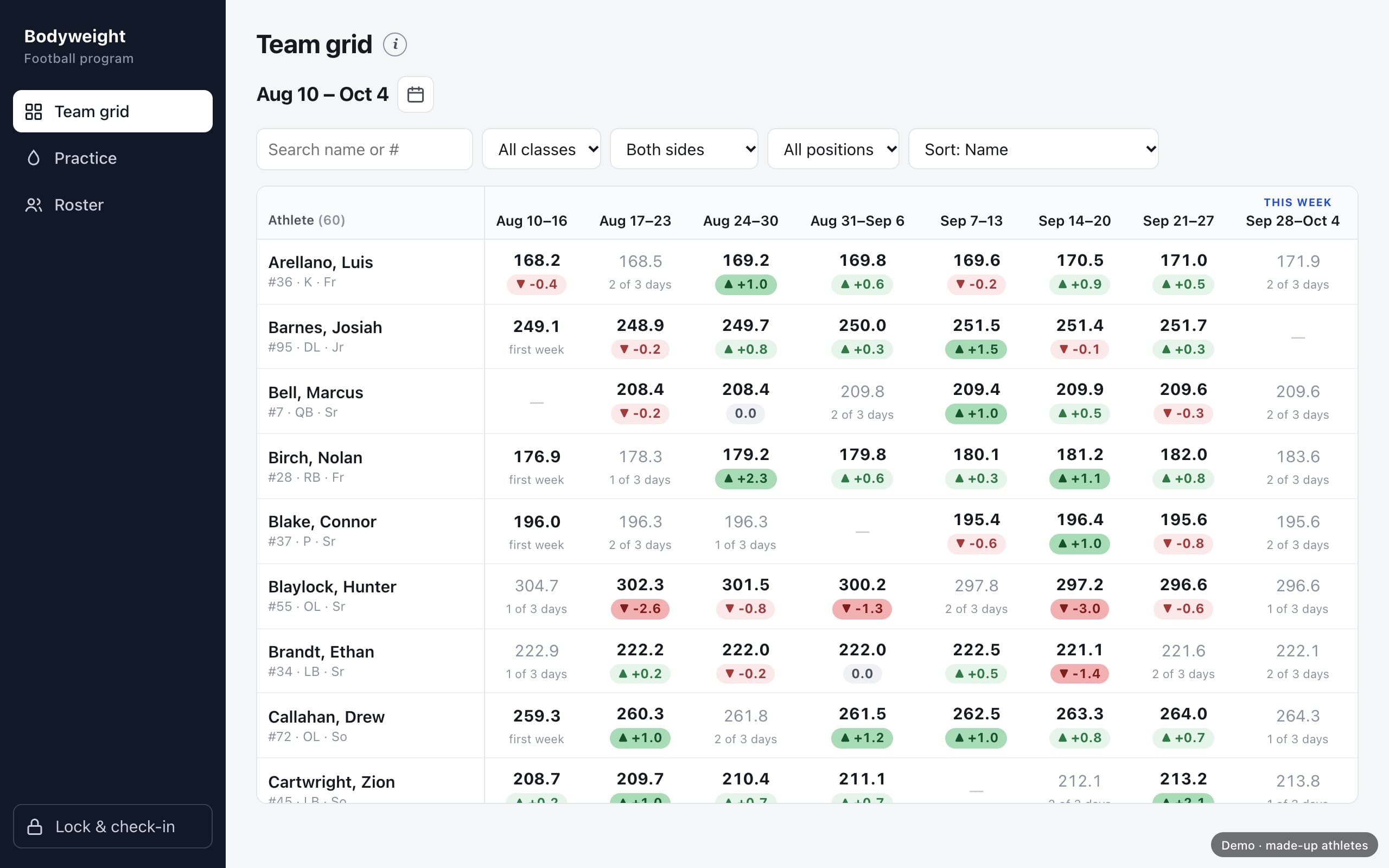
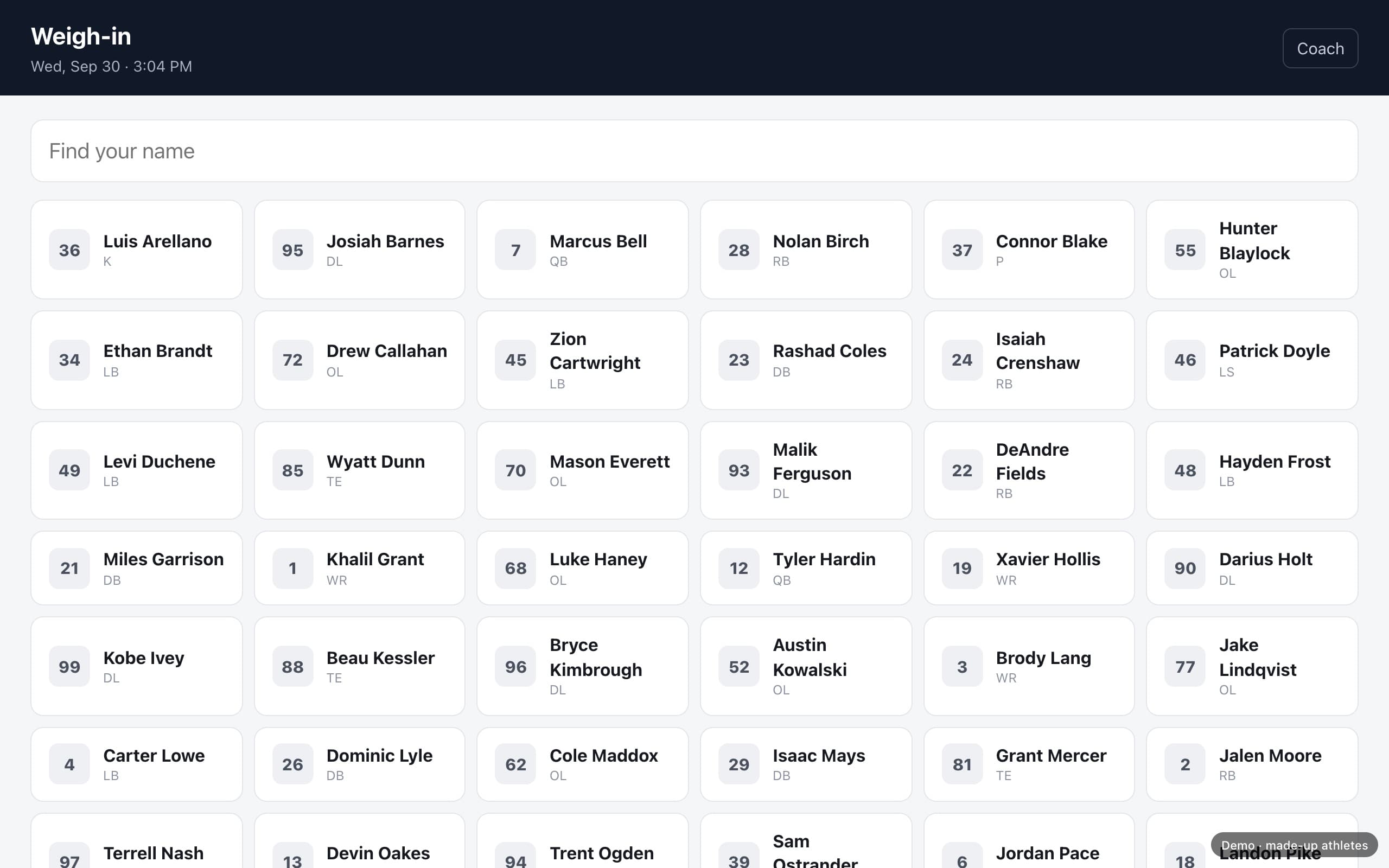
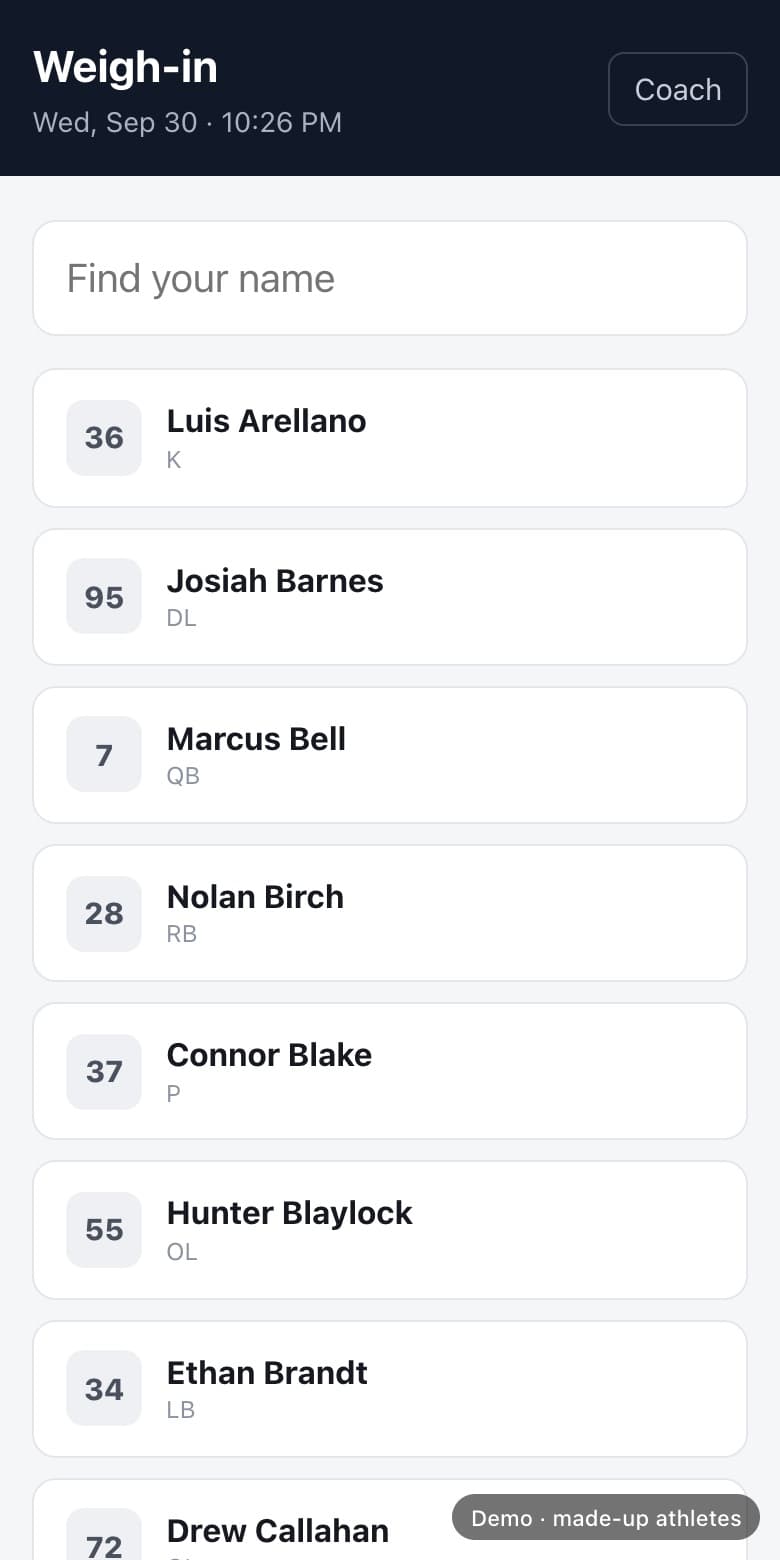
The tracker we build in the course. Made-up athletes.
- Price
- $97, once
- Lessons
- 18, plus a bonus
- Access
- Yours for life
- You Need
- A paid Claude account
Coaches, schools and training brands run on tools I built this way





Before anything else
I coached for ten years and never wrote a line of code. I assumed this was for other people. What kept me out was permission, and nobody needs to give it to you. You talk to Claude Code in plain English, the whole way through.
From coaches I have built with
Live on his own, with no help
“I feel like a freaking hacker. This is insane.”

Taylor Quick
Strength Coach, East Central CC
Set up his own copy of Strength Sheets with Claude Code.
Years of ideas, now his own platform
“Working with Cody has given me the freedom to take ideas I’ve had in my head for years and actually turn them into a platform that feels like my own. I don’t have to understand the technical side or fit my ideas into a template—I can explain what I want it to do, how I want it to work, and he finds a way to bring it to life. That freedom has allowed me to focus on building something that truly fits my business and how I work with my athletes. If you have an idea you’ve been sitting on but don’t know how to actually build it, Cody is the guy I’d trust to help you make it real.”

Jordan Collins
Jordan Collins Performance
Had his coaching platform built with Cody.
Saved, Tried,
Never Built.
The Saved Posts
A folder full of AI tips. You meant to try every one of them.
The Copy and Paste
Claude Chat writes something close. You copy it, paste it into files, carry every piece by hand, and start over when it breaks.
The Idea
The tool you would make for your own work. Started twice, stopped twice.
Every gap you leave, AI fills with a guess. Learn to leave fewer gaps. Then let the work land in a folder on your own computer, where it stays.
The next step
Same Claude.
Now it has hands.
Claude Chat and Claude Code live in the same app, and they look almost the same. You type in a box either way. The difference is where the work ends up.
What you use now
Claude Chat
- You type. It answers.
- It can build you a page and hand it to you.
- To keep it, you download it and carry it yourself.
- Every change comes back as a new copy.
The next step
Claude Code
- You type the same way.
- It makes the files in a folder on your computer.
- It opens them and runs what it made.
- Ask for a change and the same file gets better.
Keep using Claude Chat to think, plan and ask questions. When you want something built, open Claude Code.
The build along
I build a real tool, start to finish.
You build yours alongside.
A bodyweight tracker for a football program. Athletes weigh in by tapping their name. The coach sees the whole team, week by week. It gets built on screen from the very first request, on my own computer. You build yours on yours.
- 01
Say what you want
One request that covers the job, the people and how you want it back.
- 02
Answer its questions
Claude Code asks before it builds. You answer in plain words.
- 03
Open it on your computer
The first version runs right there, in your browser.
- 04
Check it, then shape it
Find what it got wrong, and change one thing at a time.
Only have an idea? Build the tracker with me. Every request I paste is in your Kit, word for word.
The doors are closed right now. The waitlist gets in first.
Eighteen Lessons and a Bonus.
Six Modules, in Order.
A welcome, then six modules. Watch them in order. Each module starts where the last one stopped.
How It Works
By the endYou know why AI answers come back wrong, and when to use Claude Chat and when to use Claude Code.
2 lessons
- 1.1Why It Guesses
- 1.2Claude Chat Hands It to You. Claude Code Builds It on Your Computer
Set Up Your Machine
By the endClaude Code is installed, you know what every piece is, and nothing happens without your yes.
3 lessons
- 2.1Ask Why Before You Approve
- 2.2What Each Piece Is
- 2.3Nothing Happens Without Your Yes
Say Exactly What You Want
By the endYou can describe a job so Claude Code builds what you meant, and you know how to check what comes back.
3 lessons
- 3.1What You Have Is Already the Plan
- 3.2Say Exactly What You Want
- 3.3Check It, Then Shape It
The Desk It Works At
By the endClaude Code knows your project every time you sit down, and you know when to let it run.
4 lessons
- 4.1Files Are Its Memory, and What Markdown Is
- 4.2One Project, One Folder
- 4.3Two Files
- 4.4Earning Auto Mode
The System That Grows
By the endA mistake costs you minutes, and your setup gets better every week.
3 lessons
- 5.1When Something Goes Wrong, Tell Claude Code
- 5.2One Word Loads a World
- 5.3Undo and Secrets
What This Becomes
By the endYou have seen where this goes, and your next thing is written down as a plan.
2 lessons
- 6.1Your Computer, or the Internet
- 6.2Your Next Thing
Plus a bonus lesson.A brand and content system: Built Different. The same steps, used to write a brand's posts in its own voice.
The doors are closed right now. The waitlist gets in first.
How It Actually Works.
- 01
Watch in Order
Short lessons, on your own time. Nothing expires.
- 02
Paste Every Request
Every request I use on screen is in the Build Along file, word for word.
- 03
Build Yours Alongside
My tracker on my screen, your thing on yours. Or build the tracker with me.
- 04
Stuck? Type One Word
The Stuck Command in your Kit walks you through it. Or reply to any email from me.
The Kit.
Eleven Files, Ready to Use.
Download them and drop them straight into your own Claude. Each lesson names the one that goes with it.
- 01
The Setup Guide
From a blank machine to a ready one, with a picture of the right screen at every step.
- 02
The Setup Guide, for Windows
The same road on a PC, with a fix for every place Windows behaves differently.
- 03
Your House Rules Starter
Fill it in once. From then on Claude Code knows who you are and how you work.
- 04
The Front Door Template
Holds what your project is and where it stands, so you can leave for three weeks and pick it straight back up.
- 05
Describe the Job
The request that tells Claude Code exactly what you want. The one you will use most.
- 06
Check Your Work
Makes Claude Code attack its own work and tell you what you missed.
- 07
The Build Along File
Every request from the tracker build, in order, word for word.
- 08
The 30 Day Plan
The questions already asked. Fill in the answers and you know what to do on Tuesday.
- 09
The Plain Words Glossary
Every word in the course, explained from zero.
- 10
The Carousel Runbook
Prompts that turn what you know into an Instagram post, in your own voice.
- 11
The Stuck Command
Type one word when something will not work. It walks you through it.
Read this before you buy
This is skill-building, and skill takes reps.
Some answers will come back wrong early on. Catching them is part of the course, and lesson 3.3 is about exactly that.
I build my tracker on screen and hand you every request I paste. Your own tool is yours to build. If you want me in your build, that is a separate hour. If you want it built for you, that is a separate service.
Who This Is For
This is for you if
- You have a tool in your head for your own work
- You have tried AI and hit a wall you could not name
- You would rather build it than wait on someone
- You can install software on your own computer
Skip it if
- You want someone to build it for you (I do that too, as a separate service)
- You want a live call every week
- You already write software for a living
- You want something to watch and never try
The doors are closed right now. The waitlist gets in first.
Price
Build With AI: Fundamentals
$97
One payment. One price for everyone.
The doors are closed right now. The waitlist gets in first.
What you get
- Eighteen lessons and a bonus lesson, yours for life
- Anything I add later, at no extra cost
- All eleven Kit files
- A certificate of completion
- Reply to any email from me
What you need
- A Mac on macOS 13 or newer, or a PC on Windows 10 or newer
- A paid Claude account
- A computer you can install software on
Get set up, or get your $97 back.Follow the Setup Guide in Module 2. If Claude Code is not running on your computer within 7 days of buying, email me. I will help you fix it. If we can't, I refund you.

“If it slows a coach down on a Monday morning, it does not ship.”
Who is teaching this
Hey, I'm Cody.
I coached first.
Ten Years on the Floor.
Programs, testing days, and one spreadsheet only I could fix.
Then I lost the job, in March 2026.
By then I had spent a year at night building the tools I always wanted.
Now coaches run on them.
Schools, gyms and training brands use software I built, every day.
Questions.
Do I still use Claude Chat?
Yes. Keep using it to think, plan and ask questions. When you want something built, you open Claude Code, in the same app.
Do I need to know how to code?
No. I had never written a line of code. You talk to Claude Code in plain English, the whole way through.
What gets built in the course?
A bodyweight tracker for a football program, on screen, from the very first request. Build it with me, or build your own thing with the same steps.
Is this only for coaches?
The examples come from coaching. The steps work for anything you want to make for your own work.
Does my tool go on the internet?
It runs On your own computer. Lesson 6.1 shows the difference between that and a tool on the internet.
Can you just build it for me?
Yes. That is a separate service. I build tools for coaches and gym owners. Tell me about yours at clhstrength.com/apply.
Mac or Windows?
Every video shows a Mac on macOS 13 or newer. You can do the whole course on Windows 10 or newer too. For setup on a PC, follow the Windows guide in the Kit.
How long does it take?
As long as you want. You watch in order, on your own time, and nothing expires.
What if I get stuck?
Type /stuck. The Stuck Command in your Kit walks you through it. If that is not enough, reply to any email from me. If it is about your own build, book the hour.
What if setup does not work?
Get set up, or get your $97 back. If Claude Code is not running on your computer within 7 days of buying, email me. I will help you fix it. If we can't, I refund you.
What else do I need to buy?
A paid Claude account. Nothing else in the course costs money.
Do I get a certificate?
Yes. Finish the last lesson, fill in the short survey, and your certificate of completion is ready to download and share.
What does an hour with you cost?
$125, booked online. It is for your own build and separate from the course.
Same Month
Either Way.
A month from now you can still have the saved posts, the copy and paste, and the idea.
Or you can have Claude Code set up on your computer, the steps to build with it, and a plan for your next thing.
The doors are closed right now. The waitlist gets in first.
Get set up within 7 days, or get your $97 back.
P.S. If you only read one thing
Every gap you leave, Claude Code fills with a guess. This course teaches you to leave fewer gaps, then shows you every step of building a real tool with that one idea.
Cody